


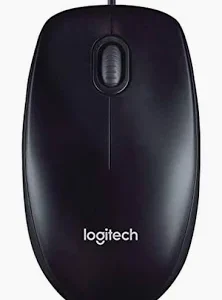
M170 MOUSE
- Optical – wireless – Radio frequency – black – USB – computer – scroll wheel – 2 buttons) – symmetrical
- Radio frequency wireless connectivity offers more freedom for people who want to control their computers from a distance
- Built-in 2-Buttons and scrolling wheel for fast page navigation and better control over browsers’ Tabs
- Pointing device wireless technology: radio frequency
- Number of Total buttons: 2
KSH 2000
KSh 2,000.00
The Logitech M170 is a wireless mouse designed for everyday use, offering a balance of simplicity, reliability, and affordability. It is part of Logitech’s extensive lineup of computer peripherals, which are known for their quality and user-friendly design. The M170 is aimed at users who need a dependable mouse for general tasks such as browsing the web, working on documents, or light gaming. Below is a comprehensive description of the Logitech M170 mouse, covering its design, features, performance, and overall usability.
Design and Build Quality
The Logitech M170 features a compact and ergonomic design, making it suitable for a wide range of hand sizes and grip styles. Its shape is ambidextrous, meaning it can be used comfortably by both right-handed and left-handed users. The mouse is lightweight, weighing approximately 82 grams (including the battery), which makes it easy to carry around and use for extended periods without causing fatigue.
The body of the M170 is made primarily of plastic, with a matte finish that resists fingerprints and provides a comfortable grip. The smooth contours and rounded edges ensure that the mouse fits naturally in the hand, reducing strain during prolonged use. The scroll wheel is rubberized, offering a tactile feel and precise control when scrolling through documents or web pages.
The mouse is available in several color options, including black, red, and blue, allowing users to choose one that matches their preferences or setup. Its compact size makes it ideal for use with laptops or in environments where desk space is limited.
Wireless Connectivity
One of the standout features of the Logitech M170 is its wireless functionality. It uses a USB receiver (Logitech’s Unifying Receiver) to connect to a computer, providing a reliable and lag-free connection up to a range of 10 meters (33 feet). The USB receiver is small and can be plugged directly into a computer’s USB port, making it convenient for use with laptops or desktops.
The M170 operates on the 2.4 GHz wireless frequency, which ensures a stable connection even in environments with multiple wireless devices. Unlike Bluetooth mice, the M170 does not require pairing, making it easy to set up and use right out of the box.
Battery Life
The Logitech M170 is powered by a single AA battery, which is included in the package. The mouse is designed to be energy-efficient, offering up to 12 months of battery life on a single battery, depending on usage. This makes it an excellent choice for users who want a low-maintenance peripheral that doesn’t require frequent battery changes.
The mouse also features an automatic sleep mode, which helps conserve battery life when the mouse is not in use. It wakes up instantly when moved, ensuring that there is no delay when you resume work.
Performance and Features
The Logitech M170 is a basic yet functional mouse, designed for everyday tasks rather than high-performance gaming or specialized work. It has a resolution of 1000 DPI (dots per inch), which is sufficient for most general-purpose activities such as web browsing, office work, and casual gaming. The DPI setting is fixed, meaning users cannot adjust it, but it strikes a good balance between precision and speed for typical use cases.
The mouse has three buttons: a left-click button, a right-click button, and a scroll wheel that also functions as a middle button when pressed. The buttons are responsive and provide a satisfying click feel, while the scroll wheel offers smooth and accurate scrolling.
While the M170 lacks advanced features such as customizable buttons, RGB lighting, or high-DPI settings, its simplicity is one of its strengths. It is a plug-and-play device that works seamlessly with most operating systems, including Windows, macOS, Linux, and Chrome OS.
Compatibility
The Logitech M170 is compatible with a wide range of devices, including laptops, desktops, and even some tablets. It works with the following operating systems:
- Windows 7, 8, 10, or later
- macOS X 10.5 or later
- Linux
- Chrome OS
The mouse does not require any additional software or drivers to function, although users can download Logitech’s optional software to check battery status or customize basic settings if needed.
Portability
The compact size and lightweight design of the Logitech M170 make it highly portable. It is an excellent choice for users who frequently travel or work on the go. The small USB receiver can be stored inside the battery compartment when not in use, reducing the risk of losing it and making the mouse easy to carry in a laptop bag or pocket.
Pros and Cons
Pros:
- Affordable: The M170 is budget-friendly, making it accessible to a wide range of users.
- Reliable Wireless Connection: The 2.4 GHz wireless technology ensures a stable and lag-free connection.
- Long Battery Life: Up to 12 months of battery life reduces the need for frequent replacements.
- Compact and Lightweight: Easy to carry and use in tight spaces.
- Plug-and-Play: No software installation required for basic functionality.
- Ambidextrous Design: Suitable for both right-handed and left-handed users.
Cons:
- Fixed DPI: The 1000 DPI setting may not be suitable for users who require higher sensitivity.
- No Advanced Features: Lacks customizable buttons, RGB lighting, or ergonomic adjustments.
- Basic Design: While functional, the design may feel too simplistic for users seeking a premium look and feel.
Comparison with Other Logitech Mice
The Logitech M170 is often compared to other entry-level wireless mice in Logitech’s lineup, such as the M185 and M187. Here’s how it stacks up:
- M170 vs. M185: The M185 is very similar to the M170 but offers a slightly longer battery life (up to 18 months) and a more contoured shape. However, the M170 is often more affordable.
- M170 vs. M187: The M187 is designed for even greater portability, with a nano receiver that barely protrudes from the USB port. However, it has a shorter battery life (up to 8 months) compared to the M170.
Target Audience
The Logitech M170 is ideal for:
- Casual Users: Those who need a reliable mouse for everyday tasks like browsing, emailing, and document editing.
- Students: Its affordability and portability make it a great choice for students.
- Travelers: The compact design and easy storage of the USB receiver make it perfect for on-the-go use.
- Budget-Conscious Buyers: Users looking for a dependable wireless mouse without breaking the bank.https://phones4u254.co.ke/
Conclusion
The Logitech M170 is a no-frills wireless mouse that delivers reliable performance for everyday computing tasks. Its compact design, long battery life, and affordable price point make it an excellent choice for casual users, students, and professionals who need a simple and dependable peripheral. While it may lack advanced features, its ease of use and plug-and-play functionality ensure that it meets the needs of most users. Whether you’re using it at home, in the office, or on the go, the Logitech M170 is a solid and practical choice for anyone in need of a basic wireless mouse.https://sammertechnology.co.ke/
Based on 0 reviews
Be the first to review “M170 MOUSE”
Related products
-
Accesories
Huawei B313-322
Form Factor Dimensions 150 × 125 × 24 mm (TBD) Weight < 500 g Network Speed Technology LTE Cat4 (TDD / FDD) FDD Max Speed 150 Mbps (DL) / 50 Mbps (UL) TDD Max Speed 110 Mbps (DL) / 10 Mbps (UL) MIMO DL 2×2 MIMO Modulation DL: 64QAM, UL: 16QAM Frequency Bands Model B313-322 LTE (FDD/TDD) B1 / B3 / B7 / B8 / B20 / B28 / B40 UMTS B1 / B8 (No GSM support) Interfaces & Ports Ethernet 1× RJ-45 (Fast Ethernet, LAN/WAN Auto-negotiation) External Antenna 1× SMA interface for LTE SIM Card 1× SIM slot (3FF – Micro-SIM) Power Input 1× power interface (DC 12V, 1A) Buttons 1× Hi(WPS) Key, 1× Reset Key LED Indicators Network Status 1× indicator Wi-Fi Status 1× indicator Signal Strength 3× indicators (bars) Wi-Fi Standard 802.11 b/g/n MIMO 2×2 MIMO Frequency Band 2.4 GHz Power Supply Input (AC) 100 V – 240 V ~ Output (DC) 12 V, 1 A Battery Capacity 2400 mAh (optional) SKU: n/a


There are no reviews yet.